
How to Build an AI Text Agent with Pinnacle
A text agent is just a loop: receive a message, think, reply. Here's how to wire that loop in TypeScript, Python, or Ruby using Pinnacle's webhook and SDK — with an LLM in the middle.
Ivan
A text agent is deceptively simple: it receives a message, runs it through an LLM, and replies. No app to download, no special client — the user texts a number and gets a conversation back.
The hard part isn't the LLM. It's the messaging plumbing: validating inbound webhooks, extracting text from a discriminated message payload, sending the reply on the right channel. Pinnacle handles all of that so you can focus on the agent logic.
Here's the complete pattern.
The Architecture
Every text agent built on Pinnacle has the same three-step loop:
- Receive — Pinnacle delivers an inbound message to your webhook endpoint
- Think — you extract the text and pass it to your LLM (Claude, GPT-4, Gemini, anything)
- Reply — you send the response back via the Pinnacle SDK
That's the whole thing. No polling, no status endpoints, no session management baked into the protocol. Just an HTTP POST in and an API call out.
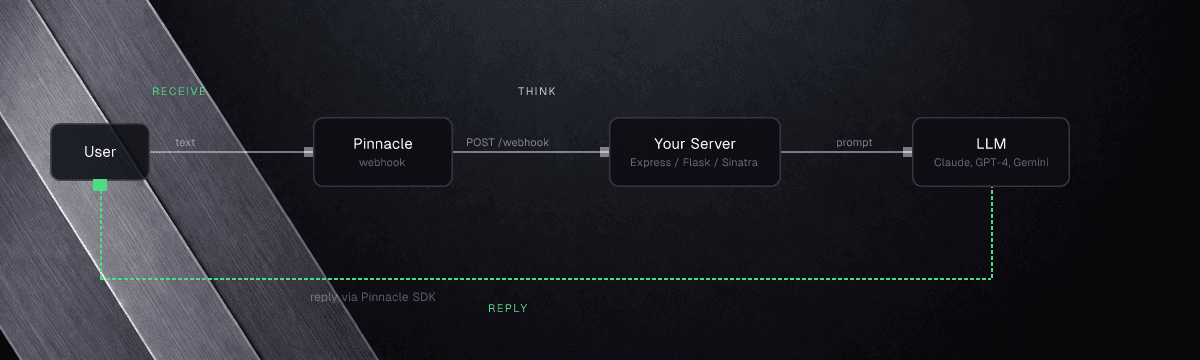 The receive-think-reply loop.
Step 1: Validate and Parse the Inbound Webhook
Pinnacle signs every webhook with a PINNACLE-SIGNING-SECRET header. Before your agent processes anything, verify the signature — otherwise anyone can POST to your endpoint and inject messages.
client.messages.process() does both in one call: it validates the signature and returns the parsed event object.
import express from "express";
import { PinnacleClient } from "rcs-js";

const app = express();
app.use(express.json());

const client = new PinnacleClient({ apiKey: process.env.PINNACLE_API_KEY! });

app.post("/webhook", async (req, res) => {
  // Acknowledge immediately — carrier reliability depends on fast 200s
  res.status(200).send();

  const event = await client.messages.process(req);

  if (event.type !== "MESSAGE.RECEIVED" || event.direction !== "INBOUND")
    return;

  // event.message is now typed as MessageEventContent
  await handleInbound(event);
});
The process() call throws UnauthorizedError if the signature doesn't match — which surfaces as a 500 after you've already sent the 200. That's intentional: you acknowledge the carrier fast, then validate and process asynchronously so slow downstream work never causes dropped messages.
Set PINNACLE_SIGNING_SECRET in your environment — you'll find it in the Pinnacle dashboard under Settings → Webhooks.
Step 2: Extract the Text
The message field is a discriminated union with a type property. Different message types carry text in different places:
import * as Pinnacle from "rcs-js";

function extractText(message: Pinnacle.MessageEventContent): string | null {
  switch (message.type) {
    case "SMS":
    case "RCS_TEXT":
      return message.text;
    case "RCS_BUTTON_DATA":
      // User tapped a quick reply or card button
      return message.button.payload ?? (message.button.raw as string);
    default:
      return null;
  }
}
For a basic text agent you only need the SMS and RCS_TEXT cases. Button data (RCS_BUTTON_DATA) is how you handle quick reply taps — useful once you add RCS-specific UX (covered below).
Step 3: Call Your LLM
Drop in any LLM. Here's the pattern with Anthropic's Claude SDK:
import Anthropic from "@anthropic-ai/sdk";

const anthropic = new Anthropic({ apiKey: process.env.ANTHROPIC_API_KEY! });

async function runLLM(userMessage: string): Promise<string> {
  const response = await anthropic.messages.create({
    model: "claude-opus-4-7",
    max_tokens: 300,
    system:
      "You are a helpful assistant. Keep replies short — this is a text conversation.",
    messages: [{ role: "user", content: userMessage }],
  });

  const block = response.content[0];
  return block.type === "text" ? block.text : "";
}
The system prompt matters here. Text messages have no UI chrome — no scroll indicator, no modal — so brevity is critical. Tell your model to be concise. 300 tokens is generous for SMS; RCS can handle more since it renders cleanly, but users still expect conversational pace.
Step 4: Send the Reply
Use the incoming message's channel to pick the right reply method. The conversation object gives you from (the user's number) and to (your number or RCS agent ID):
async function handleInbound(event: Pinnacle.MessageEvent) {
  const userPhone = event.conversation.from;
  const myNumber = event.conversation.to;
  const userText = extractText(event.message);

  if (!userText) return;

  const reply = await runLLM(userText);

  if (event.message.type === "SMS" || event.message.type === "MMS") {
    await client.messages.sms.send({
      from: myNumber,
      to: userPhone,
      text: reply,
    });
  } else {
    // RCS_TEXT, RCS_BUTTON_DATA, etc.
    await client.messages.rcs.send({
      from: myNumber,
      to: userPhone,
      text: reply,
    });
  }
}
That's a complete text agent. User texts your number → webhook fires → LLM replies → response sent. No state, no session management, stateless.
Full Working Example
Here's the complete Express server in one file:
import express from "express";
import Anthropic from "@anthropic-ai/sdk";
import { PinnacleClient } from "rcs-js";
import * as Pinnacle from "rcs-js";

const app = express();
app.use(express.json());

const client = new PinnacleClient({ apiKey: process.env.PINNACLE_API_KEY! });
const anthropic = new Anthropic({ apiKey: process.env.ANTHROPIC_API_KEY! });

function extractText(message: Pinnacle.MessageEventContent): string | null {
  switch (message.type) {
    case "SMS":
    case "RCS_TEXT":
      return message.text;
    case "RCS_BUTTON_DATA":
      return message.button.payload ?? (message.button.raw as string);
    default:
      return null;
  }
}

app.post("/webhook", async (req, res) => {
  res.status(200).send();

  const event = await client.messages.process(req);
  if (event.type !== "MESSAGE.RECEIVED" || event.direction !== "INBOUND")
    return;

  const userText = extractText(event.message as Pinnacle.MessageEventContent);
  if (!userText) return;

  const llmResponse = await anthropic.messages.create({
    model: "claude-opus-4-7",
    max_tokens: 300,
    system: "You are a helpful assistant. Keep replies under 3 sentences.",
    messages: [{ role: "user", content: userText }],
  });

  const reply =
    llmResponse.content[0].type === "text" ? llmResponse.content[0].text : "";

  const isRcs = event.message.type !== "SMS" && event.message.type !== "MMS";

  if (isRcs) {
    await client.messages.rcs.send({
      from: event.conversation.to,
      to: event.conversation.from,
      text: reply,
    });
  } else {
    await client.messages.sms.send({
      from: event.conversation.to,
      to: event.conversation.from,
      text: reply,
    });
  }
});

app.listen(3000, () => console.log("Text agent listening on :3000"));
Install dependencies and run:
npm install rcs-js @anthropic-ai/sdk express
PINNACLE_API_KEY=pnclk_... ANTHROPIC_API_KEY=sk-ant-... PINNACLE_SIGNING_SECRET=... npx tsx server.ts
Expose your local server with ngrok or cloudflared, then register the URL in your Pinnacle webhook settings. Send a text to your Pinnacle number. You'll get a reply.
Python
Install: pip install rcs (PyPI) and pip install flask anthropic. Full receive quickstart: Python → Receive.
from flask import Flask, request, jsonify
import anthropic
from rcs import Pinnacle, RichTextMessage

app = Flask(__name__)
client = Pinnacle(api_key="pnclk_...")
anthropic_client = anthropic.Anthropic(api_key="sk-ant-...")

@app.route("/webhook", methods=["POST"])
def webhook():
    # process() expects {"headers": dict, "body": str|bytes}
    event = client.messages.process({
        "headers": dict(request.headers),
        "body": request.data,
    })

    if event.type != "MESSAGE.RECEIVED" or event.direction != "INBOUND":
        return jsonify({}), 200

    msg = event.message
    user_text = None
    if msg.type in ("SMS", "RCS_TEXT"):
        user_text = msg.text
    elif msg.type == "RCS_BUTTON_DATA":
        user_text = msg.button.payload or str(msg.button.raw)

    if not user_text:
        return jsonify({}), 200

    response = anthropic_client.messages.create(
        model="claude-opus-4-7",
        max_tokens=300,
        system="You are a helpful assistant. Keep replies short.",
        messages=[{"role": "user", "content": user_text}],
    )
    reply = response.content[0].text

    if msg.type in ("SMS", "MMS"):
        client.messages.sms.send(
            from_=event.conversation.to,
            to=event.conversation.from_,
            text=reply,
        )
    else:
        # RCS send takes a RichMessage request object
        client.messages.rcs.send(
            request=RichTextMessage(
                from_=event.conversation.to,
                to=event.conversation.from_,
                text=reply,
            )
        )

    return jsonify({}), 200
Ruby
Install: gem install rcs (RubyGems) and gem install sinatra anthropic. Full receive quickstart: Ruby → Receive.
require "sinatra"
require "rcs"
require "anthropic"

client = Pinnacle::Client.new(api_key: "pnclk_...")
anthropic = Anthropic::Client.new(api_key: "sk-ant-...")

post "/webhook" do
  body_str = request.body.read

  # process() expects { headers: Hash, body: String }
  # Rack stores custom headers as HTTP_* in env (dashes → underscores)
  event = client.messages.process(
    headers: { "PINNACLE-SIGNING-SECRET" => request.env["HTTP_PINNACLE_SIGNING_SECRET"] },
    body: body_str
  )

  halt 200 unless event.type == "MESSAGE.RECEIVED" && event.direction == "INBOUND"

  msg = event.message
  user_text = case msg.type
              when "SMS", "RCS_TEXT" then msg.text
              when "RCS_BUTTON_DATA" then msg.button.payload || msg.button.raw.to_s
              end

  halt 200 unless user_text

  response = anthropic.messages.create(
    model: "claude-opus-4-7",
    max_tokens: 300,
    system: "You are a helpful assistant. Keep replies short.",
    messages: [{ role: "user", content: user_text }]
  )
  reply = response.content.first.text

  if %w[SMS MMS].include?(msg.type)
    client.messages.sms.send_(
      from: event.conversation.to,
      to: event.conversation.from,
      text: reply
    )
  else
    client.messages.rcs.send_(
      from: event.conversation.to,
      to: event.conversation.from,
      text: reply
    )
  end

  status 200
end
Level Up: RCS Quick Replies as Conversation Steering
Plain text works for every device. But if the user is on RCS, you can send quick reply buttons that guide the conversation — like a menu that lives in the message bubble itself.
await client.messages.rcs.send({
  from: event.conversation.to,
  to: event.conversation.from,
  text: "What can I help you with?",
  quickReplies: [
    {
      type: "trigger",
      title: "Check my order",
      payload: "intent:order_status",
    },
    { type: "trigger", title: "Talk to a human", payload: "intent:escalate" },
    { type: "trigger", title: "Return an item", payload: "intent:return" },
  ],
});
When the user taps a quick reply, your webhook receives an RCS_BUTTON_DATA event. The payload is intent:order_status — extract it in extractText() and route it directly in your agent logic instead of running it through the LLM:
const userText = extractText(event.message);

// Fast path: button payloads with structured intents skip the LLM
if (userText?.startsWith("intent:")) {
  await handleIntent(userText, event);
  return;
}

// Free-text: goes to LLM
const reply = await runLLM(userText!);
This hybrid approach gives you LLM flexibility for open-ended questions and deterministic handling for common structured flows — without building a full dialog engine.
Managing Conversation History
Stateless agents forget everything between messages. For a coherent multi-turn conversation, you need to store the history somewhere and pass it to the LLM each turn.
The simplest approach: key a conversation history by phone number in a database or Redis, then prepend it to each LLM call:
// Pseudocode — swap KV for your actual store
const history = (await kv.get<Anthropic.MessageParam[]>(userPhone)) ?? [];

history.push({ role: "user", content: userText });

const response = await anthropic.messages.create({
  model: "claude-opus-4-7",
  max_tokens: 300,
  system: "You are a helpful assistant.",
  messages: history,
});

const reply =
  response.content[0].type === "text" ? response.content[0].text : "";
history.push({ role: "assistant", content: reply });

await kv.set(userPhone, history, { ex: 60 * 60 * 24 }); // 24h TTL
Pinnacle's Conversations API also stores the full message thread on the platform side — useful for syncing history across channels or viewing threads in the dashboard.
The MCP Shortcut: AI Agents That Message Users
If you're building an AI agent that should be able to reach out to users (not just respond to them), the Pinnacle MCP server is the fast path. Add it to Claude, Cursor, or any MCP host and your AI can send messages as a tool call:
{
  "mcpServers": {
    "pinnacle": {
      "command": "npx",
      "args": ["@pinnacle-rcs/mcp"],
      "env": {
        "PINNACLE_API_KEY": "pnclk_..."
      }
    }
  }
}
Then give your agent instructions like:
"When a user confirms their appointment, send them an RCS message with their booking details and a Reschedule button."
The agent calls send_rcs directly — no custom function wrappers, no webhook server needed for outbound flows. The MCP server is best for agent-initiated outbound; the webhook pattern above is for inbound conversation handling. They're complementary.
From Test to Production
Testing — Create a test RCS agent, whitelist your number, and run your webhook server locally. The full RCS experience — cards, quick replies, typing indicators — works in sandbox without carrier approval. See the test agents guide for the two-minute setup.
Going live — When your agent logic is validated, register your RCS brand and campaign via the brands dashboard. Pinnacle handles the RBM submission. For SMS/MMS, 10DLC registration takes 1–2 business days. Swap your test agent ID for your production agent ID in the from field — nothing else changes.
Key Takeaways
- A text agent is three steps: receive webhook → run LLM → send reply. That's the whole loop.
client.messages.process(req)handles signature validation and payload parsing in one call — always start here.event.message.typeis a discriminated union:SMS,RCS_TEXT,RCS_BUTTON_DATAare the common inbound cases.- Reply channel mirrors the inbound: use
client.messages.sms.send()for SMS/MMS,client.messages.rcs.send()for RCS. - RCS quick replies let you add structured conversation flows on top of free-text LLM handling.
- For agent-initiated outbound messaging, the Pinnacle MCP server is faster than building a full webhook server.
FAQ
1. How do I get a signing secret for webhook validation?
In the Pinnacle dashboard under Settings → Webhooks. Each webhook has its own signing secret. Set it as PINNACLE_SIGNING_SECRET in your environment.
2. What happens if the LLM call is slow and the carrier retries my webhook?
Carriers expect a 200 response within a few seconds — not after your LLM call completes. That's why res.status(200).send() comes first, before any async work. Pinnacle's infrastructure acknowledges the carrier event immediately and delivers to your endpoint, so your endpoint can take as long as it needs after responding.
3. Can I use any LLM — not just Anthropic?
Yes. The pattern is LLM-agnostic. The same loop works with OpenAI (openai SDK), Google Gemini (@google/generative-ai), or any API that takes a string and returns a string.
4. How do I handle STOP/HELP opt-out commands?
Check for userText.toUpperCase() === "STOP" before passing to the LLM and handle it directly.
5. Does this work for iMessage? Yes. iMessage is onboarded per-account (email founders@pinnacle.sh to enable it). Once enabled, inbound iMessage messages arrive via the same webhook with their own message type — your agent handles them identically.
6. How do I handle media (images, voice notes) sent by users?
MMS and RCS media events carry mediaUrls in the message payload. Download the media, pass the URL or base64 to a multimodal model (Claude's vision API, GPT-4o), and handle accordingly. The webhook and SDK plumbing is the same — only the LLM call changes.
Get Started
- Register a Pinnacle number at app.pinnacle.sh
- Get your API key in the Pinnacle dashboard under Settings → API Keys
- Install the SDK:
npm install rcs-js/pip install rcs/gem install rcs - Read the webhook and receiving guide for full payload documentation
- See the
process()method reference for signature validation details
Want to see how Pinnacle fits your stack? Book a 30-minute call with one of our engineers — we'll walk through your use case and get you live.